Create charts and graphics
Customize Chart Appearance
If you want to change a chart’s appearance, you can do so by using the Format tab on the Ribbon. Click on the chart you want to customize. This will display the Chart Tools tab on the Ribbon. Click on the Format tab to open the Format window. You can change the chart’s style, color, and layout, among other things.
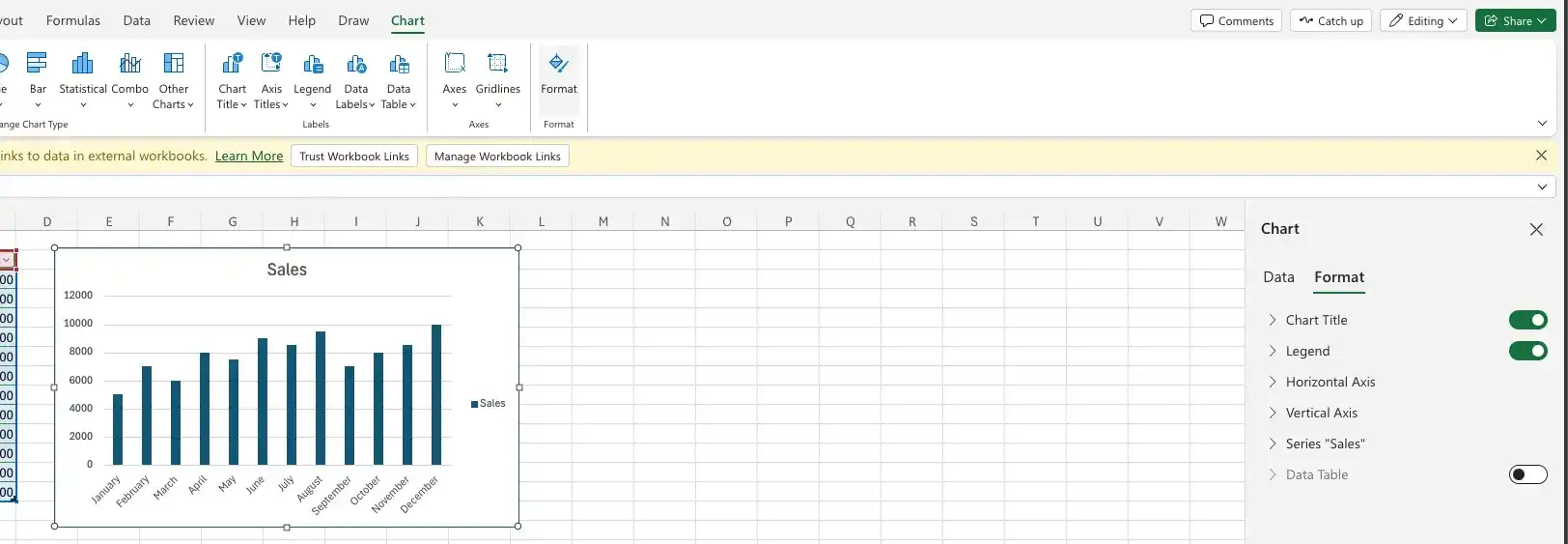
To change the series color, select Series dropdown button.
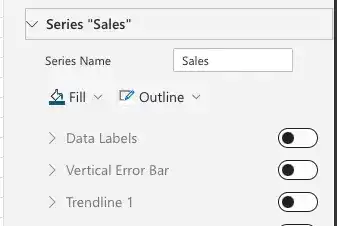
In our example the name of the series is “Sales”. Your can have other name.
Change the series color
- Click on the Series dropdown button.
- Click on the Fill and choose the color you want.
- Click on Outline and choose the color you want.
Change data labels
- Click on the Series dropdown button.
- Activate the Data Labels checkbox.
- Click on the Fill and choose the color you want.
- Click on Outline and choose the color you want.
- You can also change the font size, font style, and font color.
- You can also change the position of the data labels.
Feedback
Was this page helpful?